

Camera buying guide · Sources checked September 11, 2026
It may mean a collection of short clips spread across 90 days. It does not necessarily mean you can rewind to any moment in those three months.
Before you compare storage promises, ask two questions: what gets recorded, and how long is that recording kept? A camera can keep triggered clips for months while leaving the time between them unrecorded. Another can record a continuous timeline but retain far fewer days.
A real example: 90 days can mean 15 hours of clips
Eufy’s US page for the Video Doorbell E340 describes its built-in 8 GB storage using an assumption of 30 recordings a day, each lasting 20 seconds, over 90 days. That is the manufacturer’s scenario, not a measurement from our own testing. Eufy E340 storage FAQ.
30 clips × 20 seconds = 600 seconds, or 10 recorded minutes per day.
Across 90 days: 10 × 90 = 900 minutes = 15 hours of clips.
For comparison, an uninterrupted 90-day timeline contains 90 × 24 = 2,160 hours. That is 144 times as much recorded time. It is not a prediction of file size: video encoding and settings also affect how much space a recording uses.
The useful conclusion is not that the doorbell’s claim is wrong. It is that “days of storage” needs its recording assumptions attached. If you want to watch what happened between triggered clips, a long retention claim by itself does not answer your question.
Three phrases that describe different things
| Phrase | What it tells you | What to check next |
|---|---|---|
| Event recording | The setup saves clips when its recording rules trigger. | What triggers a clip, its length, and any gaps between clips. |
| Continuous recording | The selected mode is designed to save an ongoing timeline. | Compatible hardware, power, storage and any network or plan requirements. |
| Retention or video history | How long an existing recording can remain available. | Whether the figure applies to events, continuous video or another feature. |
A longer history cannot recover a moment the camera never saved. Likewise, continuous recording is not a promise that power, network or equipment failures cannot interrupt it.
Why does my camera recording miss the beginning?
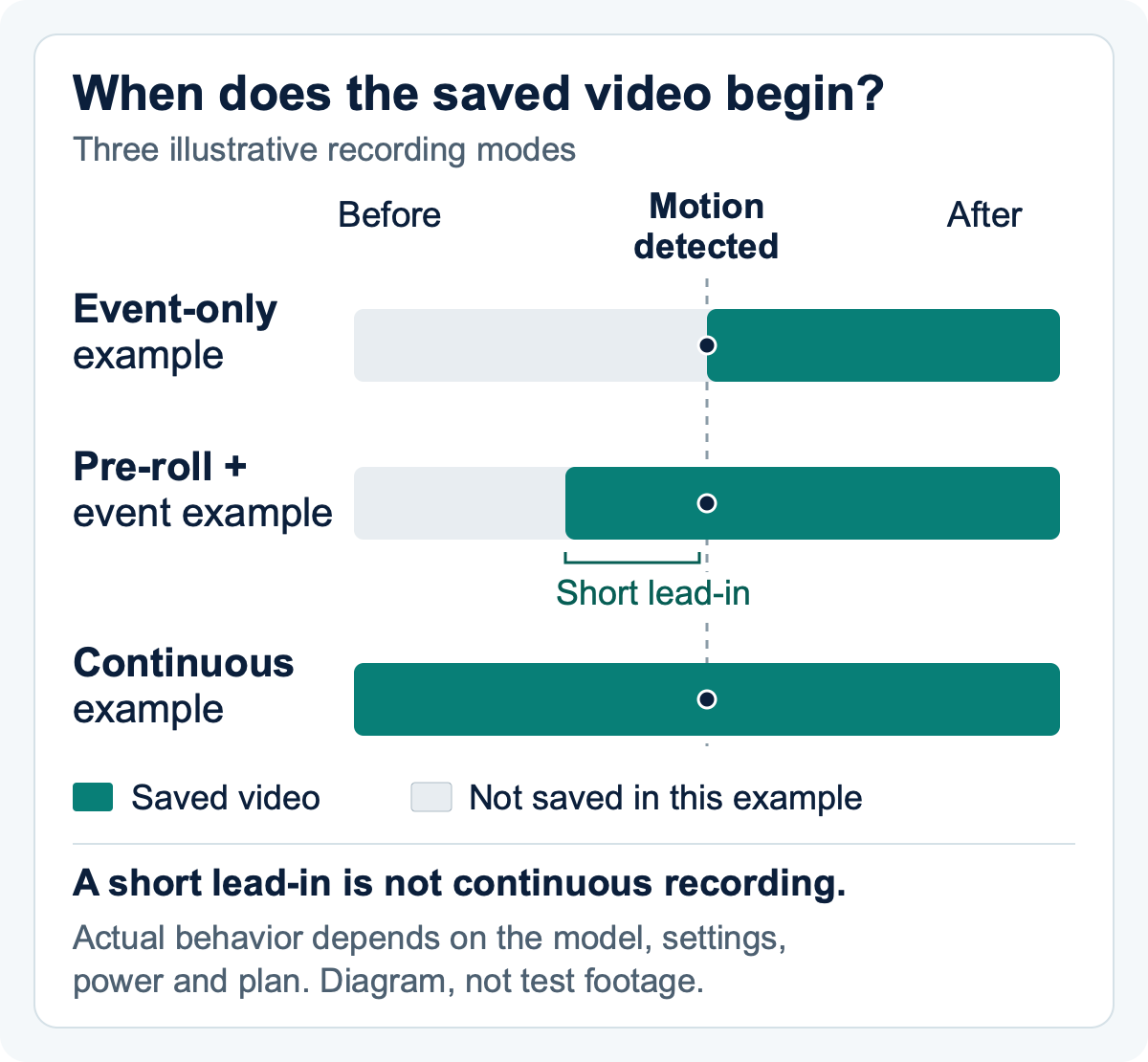
An event clip may start after someone has already entered the frame. A longer storage history cannot add the missing beginning. Look for a supported pre-roll feature—a short buffer before the trigger—or a continuous-recording setup.
A battery camera can still have pre-roll
Ring lists Color Pre-Roll for the original 1536p Battery Doorbell Pro. Ring’s general Pre-Roll guide describes up to four seconds before motion, without audio and with low-light limits. That is different from its Advanced Pre-Roll feature. Saved recordings need a compatible subscription; a live preview alone does not mean you can replay the clip later.
Sources checked September 23, 2026: Original Battery Doorbell Pro specifications · Ring Pre-Roll requirements and limits.
Four checks before you buy
- Exact model and generation: find pre-roll in that model’s documentation, not just the brand’s feature list.
- Power mode: confirm how the feature works with the battery, wiring or adapter you intend to use.
- Saved video: check that your intended plan saves the lead-in with a replayable clip, rather than only showing a live preview.
- What the lead-in contains: check its duration, sound and low-light limits separately from the main recording.
Then check the view: a recording cannot show a delivery spot outside the camera’s frame. Compare four front-door camera setups and their installation checks →
Even one brand can have two different clocks
Ring’s US support documentation allows eligible motion-event recordings to remain in the cloud for up to 180 days with a compatible subscription. Storage settings are selected per device. Increasing the setting affects newly captured recordings; it does not restore expired video. Ring event-storage settings.
Ring documents a separate limit of up to 14 days for 24/7 recordings. That feature requires an eligible camera, continuous power, a compatible paid Ring plan and a per-camera 24/7 Recording add-on; it depends on network connectivity. Its current eligible-device list includes the Indoor Cam (2nd Gen). Check your exact device rather than applying the feature to every Ring camera or doorbell. Ring 24/7 requirements and retention.
So “180 days” and “14 days” can both be accurate while describing different video on a supported setup. Compare the recording mode you intend to use.
A worksheet that makes the assumptions visible
Use this formula to translate an event-recording scenario into recorded time:
Recorded minutes per day = clips per day × average clip length in seconds ÷ 60.
Try your own recording scenario
Change the clip count, average length and number of days. This counts recorded time; it does not estimate storage capacity or guarantee footage.
Use whole numbers for clips and days. The average clip length can include decimals.
10 recorded minutes per day · 15 hours of clips over 90 days.
An uninterrupted 90-day timeline contains 2,160 hours. These figures compare time, not file size.
The starting values reproduce the manufacturer’s E340 example above. Your changes are hypothetical. Recordings may have gaps or overlap; summed clip time is not unique coverage of a day.
The first row below reproduces the published E340 assumption. The other event rows are hypothetical examples. The table counts footage; it does not estimate how many days will fit on any camera, card or hub.
| Scenario | Clips/day | Seconds/clip | Minutes/day | Hours over 90 days |
|---|---|---|---|---|
| Published E340 assumption | 30 | 20 | 10 | 15 |
| Hypothetical: more activity | 60 | 20 | 20 | 30 |
| Hypothetical: longer clips | 30 | 60 | 30 | 45 |
| Hypothetical: both change | 60 | 60 | 60 | 90 |
| Uninterrupted continuous timeline | Not applicable | Not applicable | 1,440 | 2,160 |
You cannot conclude that twice the clips always halves retention. Clip sizes, quality settings and the storage system’s behavior may differ. These rows are a way to spot an assumption mismatch, not a substitute for the exact product’s documentation.
When comparing products, write down the camera model, recording mode, storage hardware, advertised duration and the assumptions behind it. Leave unknown fields blank and ask the seller to identify the relevant manual or help article.
Local storage still needs a complete setup
Wyze documents local 24/7 recording for Cam v4 using a separate microSD card, with support up to 256 GB. The camera needs wired power; Wyze lists its outdoor power adapter as a separate requirement for outdoor use. Cloud backup and AI features are separate service choices. Wyze Cam v4 requirements · Cam v4 technical specifications.
“256 GB” tells you the supported capacity, not the number of days your chosen settings will preserve. Include the correct card and power accessories in the purchase comparison. Also check how you retrieve a saved clip, whether you need the app or a card reader, and what happens when storage fills. A local recording feature does not by itself establish every offline or remote-access behavior.
Ready to compare actual models? Our six-model camera recording comparison lists the power, storage, accessories and subscription requirements for each setup, including which models support continuous recording.
Choose the recording job before the biggest number
- You want to review detected deliveries: compare the documented event triggers, clip length and delivery-area view. Then choose a history length that gives you time to notice a problem.
- You want to inspect the minutes before and after an uncertain incident: look for a supported continuous-recording setup. Confirm its separate retention limit and operating requirements.
- You want to keep one important clip for longer: confirm the download/export process before relying on the account history. Ring specifically advises downloading recordings you need to retain beyond the available cloud period.
- You are deciding whether to cancel a plan: check what will save new footage after cancellation, separately from what happens to recordings already in the account.
For a front door, the first question is still whether the approved camera position can see where deliveries land. Recording mode and retention matter once that view is useful. Compare front-door setups and your complete costs →
Frequently asked questions
Does 90 days of storage mean 90 days of continuous video?
No. It can describe short event clips retained across that period. Check the recording mode and the assumptions attached to the claim.
How many hours are in Eufy’s E340 example?
The published assumption of 30 clips a day at 20 seconds each equals 10 recorded minutes a day, or 15 hours across 90 days. This is arithmetic applied to Eufy’s scenario, not a measured storage result.
Will doubling my clips halve the number of days stored?
Not necessarily. The worksheet compares recorded time, not file size or actual retention. Settings, clip sizes and storage behavior also matter.
Can a longer history setting bring back missing video?
It cannot recreate footage that was never recorded. Ring also states that changes to its storage duration apply to new recordings, not previously expired video.